


Linux中nginx的安装
首先是系统环境:CentOS7,Nginx版本:1.62(如需其他版本自行到官网下载)
我安装参考的是菜鸟教程的安装方式,附链接:Nginx安装配置
下面是安装教程:
Nginx 安装
一、安装编译工具及库文件
yum -y install make zlib zlib-devel gcc-c++ libtool openssl openssl-devel
二、首先要安装 PCRE
PCRE 作用是让 Nginx 支持 Rewrite 功能。
- 下载 PCRE 安装包,下载地址: http://downloads.sourceforge.net/project/pcre/pcre/8.35/pcre-8.35.tar.gz
[root@bogon src]# cd /usr/local/src/
[root@bogon src]# wget http://downloads.sourceforge.net/project/pcre/pcre/8.35/pcre-8.35.tar.gz
- 解压安装包:
[root@bogon src]# tar zxvf pcre-8.35.tar.gz - 进入安装包目录
[root@bogon src]# cd pcre-8.35 - 编译安装
[root@bogon pcre-8.35]# ./configure [root@bogon pcre-8.35]# make && make install - 查看pcre版本
[root@bogon pcre-8.35]# pcre-config --version
安装 Nginx
- 下载 Nginx,下载地址:https://nginx.org/en/download.html
[root@bogon src]# cd /usr/local/src/
[root@bogon src]# wget http://nginx.org/download/nginx-1.6.2.tar.gz
- 解压安装包
[root@bogon src]# tar zxvf nginx-1.6.2.tar.gz - 进入安装包目录
[root@bogon src]# cd nginx-1.6.2 - 编译安装
[root@bogon nginx-1.6.2]# ./configure --prefix=/usr/local/webserver/nginx --with-http_stub_status_module --with-http_ssl_module --with-pcre=/usr/local/src/pcre-8.35 [root@bogon nginx-1.6.2]# make [root@bogon nginx-1.6.2]# make install - 查看nginx版本
[root@bogon nginx-1.6.2]# /usr/local/webserver/nginx/sbin/nginx -v 到此,nginx安装完成。
Nginx 配置
- 创建 Nginx 运行使用的用户 www:
[root@bogon conf]# /usr/sbin/groupadd www [root@bogon conf]# /usr/sbin/useradd -g www www - 配置nginx.conf ,将/usr/local/webserver/nginx/conf/nginx.conf替换为以下内容 ``` [root@bogon conf]# cat /usr/local/webserver/nginx/conf/nginx.conf
user www www; worker_processes 2; #设置值和CPU核心数一致 error_log /usr/local/webserver/nginx/logs/nginx_error.log crit; #日志位置和日志级别 pid /usr/local/webserver/nginx/nginx.pid;
Specifies the value for maximum file descriptors that can be opened by this process.
worker_rlimit_nofile 65535; events { use epoll; worker_connections 65535; } http { include mime.types; default_type application/octet-stream; log_format main '$remote_addr - $remote_user [$time_local] "$request" ' '$status $body_bytes_sent "$http_referer" ' '"$http_user_agent" $http_x_forwarded_for';
charset gb2312;
server_names_hash_bucket_size 128; client_header_buffer_size 32k; large_client_header_buffers 4 32k; client_max_body_size 8m;
sendfile on; tcp_nopush on; keepalive_timeout 60; tcp_nodelay on; fastcgi_connect_timeout 300; fastcgi_send_timeout 300; fastcgi_read_timeout 300; fastcgi_buffer_size 64k; fastcgi_buffers 4 64k; fastcgi_busy_buffers_size 128k; fastcgi_temp_file_write_size 128k; gzip on; gzip_min_length 1k; gzip_buffers 4 16k; gzip_http_version 1.0; gzip_comp_level 2; gzip_types text/plain application/x-javascript text/css application/xml; gzip_vary on;
limit_zone crawler $binary_remote_addr 10m;
下面是server虚拟主机的配置
server { listen 80;#监听端口 server_name localhost;#域名 index index.html index.htm index.php; root /usr/local/webserver/nginx/html;#站点目录 location ~ .*.(php|php5)?$ {
  #fastcgi_pass unix:/tmp/php-cgi.sock;
  fastcgi_pass 127.0.0.1:9000;
  fastcgi_index index.php;
  include fastcgi.conf;
}
location ~ .*\.(gif|jpg|jpeg|png|bmp|swf|ico)$
{
  expires 30d;
access_log off;
}
location ~ .*\.(js|css)?$
{
  expires 15d;
access_log off;
}
access_log off;
}
}
3. 检查配置文件nginx.conf的正确性命令:
[root@bogon conf]# /usr/local/webserver/nginx/sbin/nginx -t

-----
### 启动 Nginx
1. Nginx 启动命令如下:
[root@bogon conf]# /usr/local/webserver/nginx/sbin/nginx

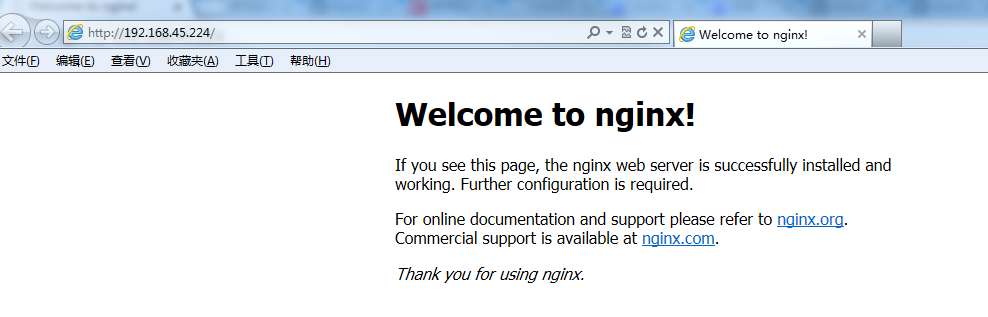
### 访问站点
2. 从浏览器访问我们配置的站点ip:
### Linux中Nginx常用命令
查询Nginx端口号 ps -ef|grep nginx 从容停止nginx kill - QUIT nginx 主进程号 停止Nginx的所有进程 pkill -9 nginx
/usr/local/webserver/nginx/sbin/nginx -s reload # 重新载入配置文件 /usr/local/webserver/nginx/sbin/nginx -s reopen # 重启 Nginx /usr/local/webserver/nginx/sbin/nginx -s stop # 停止 Nginx /usr/local/webserver/nginx/sbin/nginx #启动Nginx
### Linux中nginx配置多个访问渠道
实用场景:两个Tomcat,通过域名Https访问

配置server针对性进行修改即可,下面代码中已有注释,不理解可以评论留言,看到会及时回复的
server {
listen 443 ssl; #这个地方监听443 ssl不写可能会报错
server_name xxx.com; #这里填写自己的域名信息
ssl_certificate /usr/local/webserver/nginx/xxx.com.pem; # 指定证书的位置,绝对路径
ssl_certificate_key /usr/local/webserver/nginx/xxx.com.key; # 绝对路径,同上
ssl_session_timeout 5m;
    ssl_session_cache shared:SSL:10m;
   ssl_protocols TLSv1 TLSv1.1 TLSv1.2 SSLv2 SSLv3;
   ssl_ciphers ALL:!ADH:!EXPORT56:RC4+RSA:+HIGH:+MEDIUM:+LOW:+SSLv2:+EXP;
    ssl_prefer_server_ciphers on;
    ssl_verify_client off;
   # ssl_session_timeout 5m;
   # ssl_protocols TLSv1 TLSv1.1 TLSv1.2; #按照这个协议配置
   # ssl_ciphers ECDHE-RSA-AES128-GCM-SHA256:HIGH:!aNULL:!MD5:!RC4:!DHE;#按照这个套件配置
   # ssl_prefer_server_ciphers on;

location /wss {
    proxy_redirect off;
        proxy_pass http://127.0.0.1:8888;
        proxy_set_header Host $host;
        proxy_set_header X-Real_IP $remote_addr;
        proxy_set_header X-Forwarded-For $remote_addr:$remote_port;
        proxy_http_version 1.1;
        proxy_set_header Upgrade $http_upgrade;
        proxy_set_header Connection upgrade;
    proxy_read_timeout 60000s;
    }
下面的配置大同小异,基本就是制定项目的访问路径,照猫画虎即可。
location /mblog{
    proxy_set_header Host $host;
    proxy_pass http://127.0.0.1/mblog/;
    client_max_body_size 200m;
    proxy_set_header X-Forwarded-Proto  $scheme;
        #root   html; #站点目录,绝对路径
       #            index  index.html index.htm;
        }
location /ry {
    proxy_set_header Host $host;
    proxy_pass http://127.0.0.1/ry;
    client_max_body_size 200m;
    proxy_set_header X-Forwarded-Proto  $scheme;
        #root   html; #站点目录,绝对路径
       #            index  index.html index.htm;
    }


location /jeesite{
    proxy_set_header Host $host;
    proxy_pass http://127.0.0.1:8080/jeesite/;
    client_max_body_size 200m;
    proxy_set_header X-Forwarded-Proto  $scheme;
    proxy_redirect http:// $scheme://;
}

    #charset koi8-r;

    #access_log  logs/host.access.log  main;


    #error_page  404              /404.html;

    # redirect server error pages to the static page /50x.html
    #
    error_page   500 502 503 504  /50x.html;
    location = /50x.html {
        root   html;
    }

    # proxy the PHP scripts to Apache listening on 127.0.0.1:80
    #
    #location ~ \.php$ {
    #    proxy_pass   http://127.0.0.1;
    #}

    # pass the PHP scripts to FastCGI server listening on 127.0.0.1:9000
    #
    #location ~ \.php$ {
    #    root           html;
    #    fastcgi_pass   127.0.0.1:9000;
    #    fastcgi_index  index.php;
    #    fastcgi_param  SCRIPT_FILENAME  /scripts$fastcgi_script_name;
    #    include        fastcgi_params;
    #}

    # deny access to .htaccess files, if Apache's document root
    # concurs with nginx's one
    #
    #location ~ /\.ht {
    #    deny  all;
    #}
}
### Nginx配置多域名在同一服务器
server { listen 80; server_name xxx.xx xxx1.xx; charset utf-8; if ($host = 'xxx.xx') { rewrite ^/(.) https://xxx.xx/$1 permanent; } if ($host = 'xxx1.xx') { rewrite ^/(.) https://xxx1.xx/$1 permanent; } return 301 https://$host$request_uri;
    location / {
        root   html;
        index  index.html index.htm;
    }

    error_page   500 502 503 504  /50x.html;
    location = /50x.html {
        root   html;
    }

}
server {
    listen       443  ssl;
    server_name  xxx1.xx;
    ssl_certificate xxx;  # 指定证书的位置,绝对路径
    ssl_certificate_key xxx;  # 绝对路径,同上

ssl_session_timeout 5m;
    ssl_session_cache shared:SSL:10m;
   ssl_protocols TLSv1 TLSv1.1 TLSv1.2 SSLv2 SSLv3;
   ssl_ciphers ALL:!ADH:!EXPORT56:RC4+RSA:+HIGH:+MEDIUM:+LOW:+SSLv2:+EXP;
    ssl_prefer_server_ciphers on;
    ssl_verify_client off;
   # ssl_session_timeout 5m;
   # ssl_protocols TLSv1 TLSv1.1 TLSv1.2; #按照这个协议配置
   # ssl_ciphers ECDHE-RSA-AES128-GCM-SHA256:HIGH:!aNULL:!MD5:!RC4:!DHE;#按照这个套件配置
   # ssl_prefer_server_ciphers on;
location / {
        #gzip_static on; # 静态压缩
        add_header Cache-Control public,max-age=60,s-maxage=60; # 配置缓存
        proxy_pass http://127.0.0.1:xxxx/;
        proxy_set_header HOST $host;
        client_max_body_size 200m;
        proxy_set_header X-Forwarded-Proto $scheme;
        proxy_set_header X-Real-IP $remote_addr;
        proxy_set_header X-Forwarded-For $proxy_add_x_forwarded_for;
}

location /upload/ {
  access_log off;
  # 域名白名单,去掉则阻止所有非本站请求
  valid_referers none blocked server_names *.bbchin.com 127.0.0.1 localhost ~\.google\. ~\.baidu\. ~\.qq\.;
  if ($invalid_referer) {
    rewrite ^/ https://cdn.jsdelivr.net/gh/qinhua/cdn_assets/img/robber.jpg;
  }
  proxy_pass http://127.0.0.1:xxxx;
}
    error_page   500 502 503 504  /50x.html;
    location = /50x.html {
        root   html;
    }

}

server {
    listen       443  ssl;
    server_name  xxx.xx;
    ssl_certificate xxx;  # 指定证书的位置,绝对路径
    ssl_certificate_key xxx;  # 绝对路径,同上

    ssl_session_timeout 5m;
        ssl_session_cache shared:SSL:10m;
    ssl_protocols TLSv1 TLSv1.1 TLSv1.2 SSLv2 SSLv3;
    ssl_ciphers ALL:!ADH:!EXPORT56:RC4+RSA:+HIGH:+MEDIUM:+LOW:+SSLv2:+EXP;
        ssl_prefer_server_ciphers on;
        ssl_verify_client off;
       # ssl_session_timeout 5m;
       # ssl_protocols TLSv1 TLSv1.1 TLSv1.2; #按照这个协议配置
       # ssl_ciphers ECDHE-RSA-AES128-GCM-SHA256:HIGH:!aNULL:!MD5:!RC4:!DHE;#按照这个套件配置
       # ssl_prefer_server_ciphers on;
    location / {
            #gzip_static on; # 静态压缩
            add_header Cache-Control public,max-age=60,s-maxage=60; # 配置缓存
            proxy_pass http://127.0.0.1:xxxx/;
            proxy_set_header HOST $host;
            client_max_body_size 200m;
            proxy_set_header X-Forwarded-Proto $scheme;
            proxy_set_header X-Real-IP $remote_addr;
            proxy_set_header X-Forwarded-For $proxy_add_x_forwarded_for;
    }
    location /upload/ {
      access_log off;
      # 域名白名单,去掉则阻止所有非本站请求
      valid_referers none blocked server_names *.bbchin.com 127.0.0.1 localhost ~\.google\. ~\.baidu\. ~\.qq\.;
      if ($invalid_referer) {
        rewrite ^/ https://cdn.jsdelivr.net/gh/qinhua/cdn_assets/img/robber.jpg;
      }
      proxy_pass http://127.0.0.1:xxxx;
    }
}
### Nginx中Https不跳转Http解决方法
在代理中配置如下指令
proxy_redirect http:// $scheme://; ```
以上指令会将后端响应header location内容中的http:替换成用户端协议https:。 NGINX访问https跳转到http的解决了~